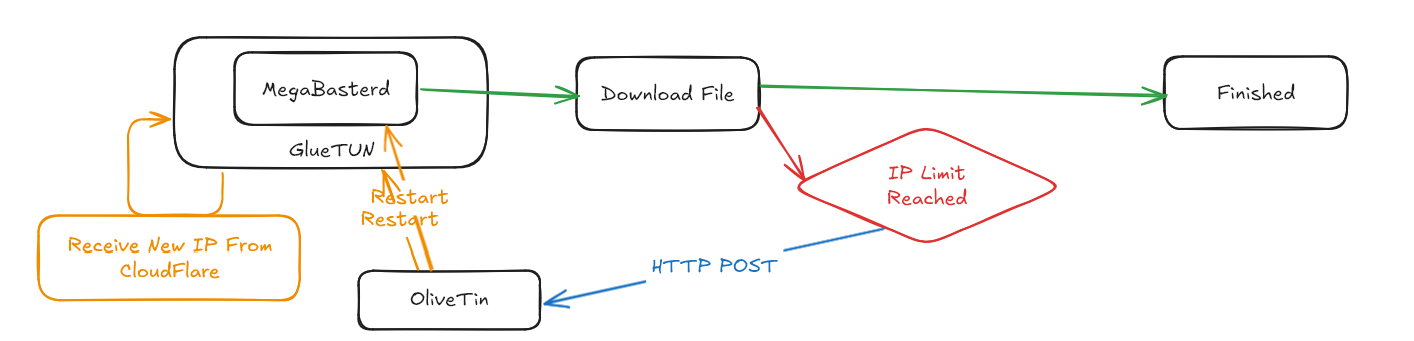
https://gitlab.com/Misaka-blog/warp-script
Gluetun
https://github.com/qdm12/gluetun-wiki
In the download server, stored in ~/docker/warpstack and in individual folders megabasterd and gluetun
Docker-compose
services:
  gluetun:
    image: qmcgaw/gluetun
    container_name: gluetun
    cap_add:
      - NET_ADMIN
    devices:
      - /dev/net/tun:/dev/net/tun
    ports:
      - 8888:8888/tcp # HTTP proxy
      - 8388:8388/tcp # Shadowsocks
      - 8388:8388/udp # Shadowsocks
      - 5861:5860
    volumes:
      - ~/docker/gluetun:/gluetun
    env_file:
      - .env # keys
      - wg.env # ip and port
    environment:
      - VPN_SERVICE_PROVIDER=custom
      - VPN_TYPE=wireguard
      - WIREGUARD_ADDRESSES=172.16.0.2/32
      - FIREWALL_OUTBOUND_SUBNETS=10.10.120.0/24
Additional configuration such as NET_ADMIN and the /dev/net/tun are needed.
The ports 5861:5860 is for forwarding ports of other containers
- the port
5861is the port accessible on the host and bind to5860in the container - the port
5860is added via other container
The environments are split into 3 parts
environments: non-secret general configurations.envWireguard public and private keys which should changewg.envWireguard IP address and port information, it is separate to allow easy changing by other programs
FIREWALL_OUTBOUND_SUBNETS - this is the subnet for local network outside of Docker, it will be used so the container under VPN will also be able to connect to other computers outside Docker
Adding containers to Wireguard VPN
network_mode: "service:gluetun" # container:gluetun if outside of compose stackUses special network mode, no port mapping is needed as it won’t work. The port has to be set on application level.
Eg. usually 81:80 is required for other computers to access web port on a container, but when it’s under gluetun,. The containers port 80 is mapped to gluetun’s port 80 and port forwarding needs to be done via gluetun. If multiple containers runs on port 80 internally, the port must be changed via application settings.
MegaBasterd
megabasterd:
    image: vttc08/megabasterd
    network_mode: "service:gluetun"
    volumes:
      - "~/docker/warpstack/megabasterd:/config:rw"
      - "/mnt/nvme/share/VNC/megabasterd_dl:/output:rw"
    environment:
      - VERSION=8.14
      - KEEP_APP_RUNNING=1
      - WEB_LISTENING_PORT=5860
    env_file: ~/docker/vnc/vnc.env
    restart: unless-stopped
    container_name: megabasterd
Use the environment WEB_LISTENING_PORT=5860 to change the port in case multiple jlesage containers are needed behind a VPN, since all jlesage containers runs on port 5800.
ADD SQL OPTIONS LATER
run_command_path|/config/reset.sh
kill -s SIGTERM 1 # kill a container from inside
Change this in MegaBasterd, by default jlesage apps including this have configuration files located in /config, create reset.sh with the following content.
#!/bin/sh
wget --post-data='{"actionId": "reset-megabasterd"}' --header='Content-Type: application/json' http://10.10.120.16:1378/api/StartAction10.10.120.16:1378is the OliveTin server- uses
wgetinstead ofcurlto POST data as it’s the default included in jlesage containers - the OliveTin has action ID of
reset-megabasterd - uses OliveTin to execute scripts which restart the entire stack