https://youtu.be/gw2Vl1h89Wo
Based on HTTPS
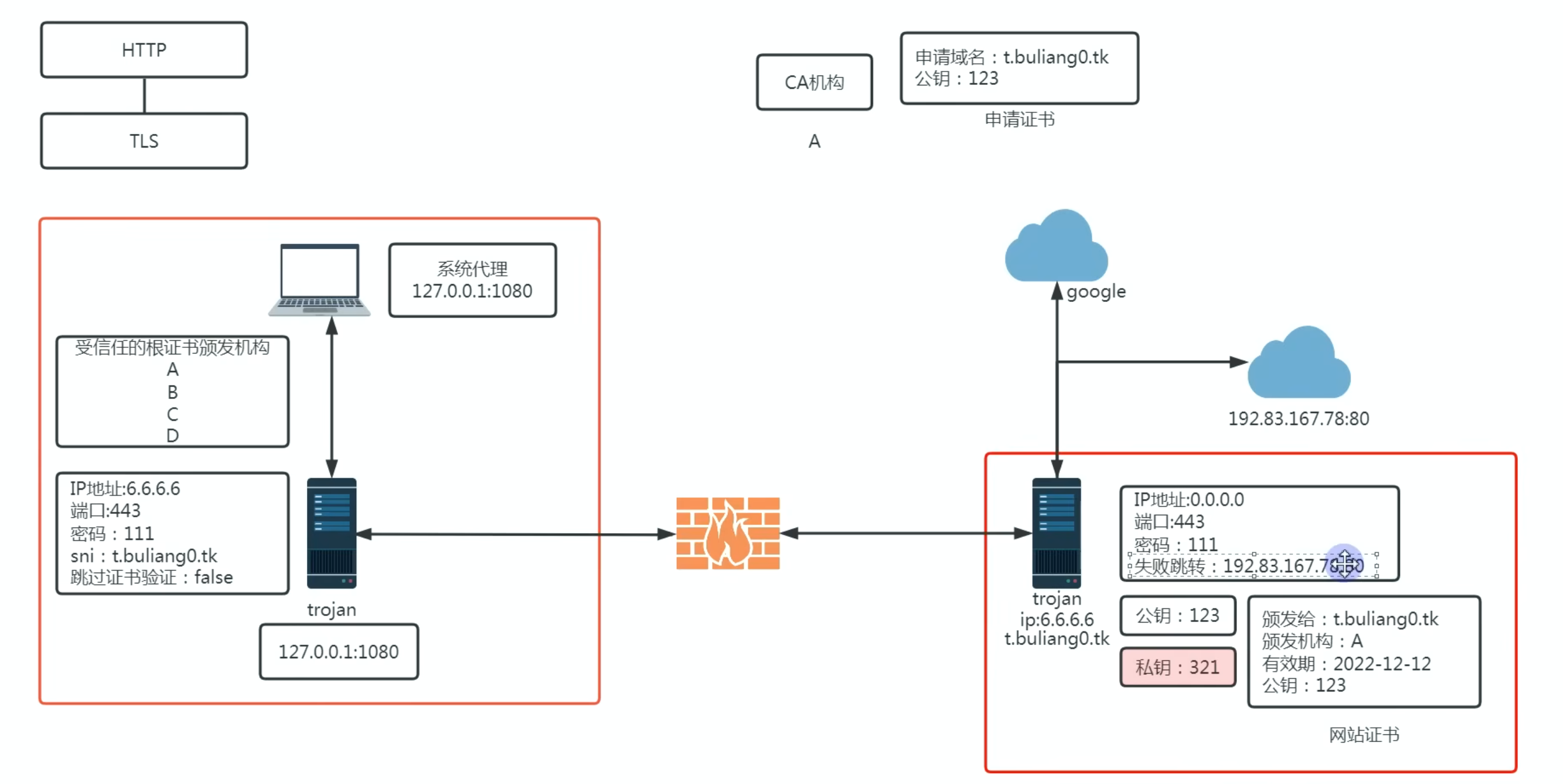
Trojan requires a website certificate and runs on 443 (or 8443)
https://developers.cloudflare.com/fundamentals/reference/network-ports/#network-ports-compatible-with-cloudflares-proxy
- optional password: Trojan will only process requests matching that password

Trojan will encrypted both the HTTPS content (already encrypted) and SNI
- it has a header e.g.
Trojan:passso it can identify it - follows HTTPS process
- public and private key cryptography for processing content
- which encapsulate the real HTTP/S response under Trojan
Browser send application level HTTP/S response to origin server but handled by proxy
Proxy (Trojan) appends the trojan header and encrypts the entire content with the same HTTPS
- then send the request to the VPS with the SNI and IP/port
VPS decrypt the content (since it has the private key) and see if Trojan header is there
- if it’s not Trojan or wrong password, then reverse proxy to the fake site
VPS forward the original HTTPS traffic to the origin server for it to decrypt and send back.
Download
https://github.com/p4gefau1t/trojan-go
Require config.json in the same path of binary
{
    "run_type": "server",
    "local_addr": "0.0.0.0",
    "local_port": 443,
    "remote_addr": "127.0.0.1",
    "remote_port": 80,
    "password": [
        "your_awesome_password"
    ],
    "ssl": {
        "cert": "server.crt",
        "key": "server.key"
    }
}- server.crt - public key
- server.key - private key
ACME
ACME install (for requesting certs)
Moved to domain-certs
Domain-less
ssl-certificates_writeup
Bulianglin’s method
Generate certificate authority
openssl ecparam -genkey -name prime256v1 -out ca.key Generate certificate from the CA key
openssl req -new -x509 -days 36500 -key ca.key -out ca.crt -subj "/CN=yoursni.com"In practice
In 3x-ui, it’s straight forward, just add the inbound rule
By default, there’s no SNI or TLS, it uses TCP