Typefaces
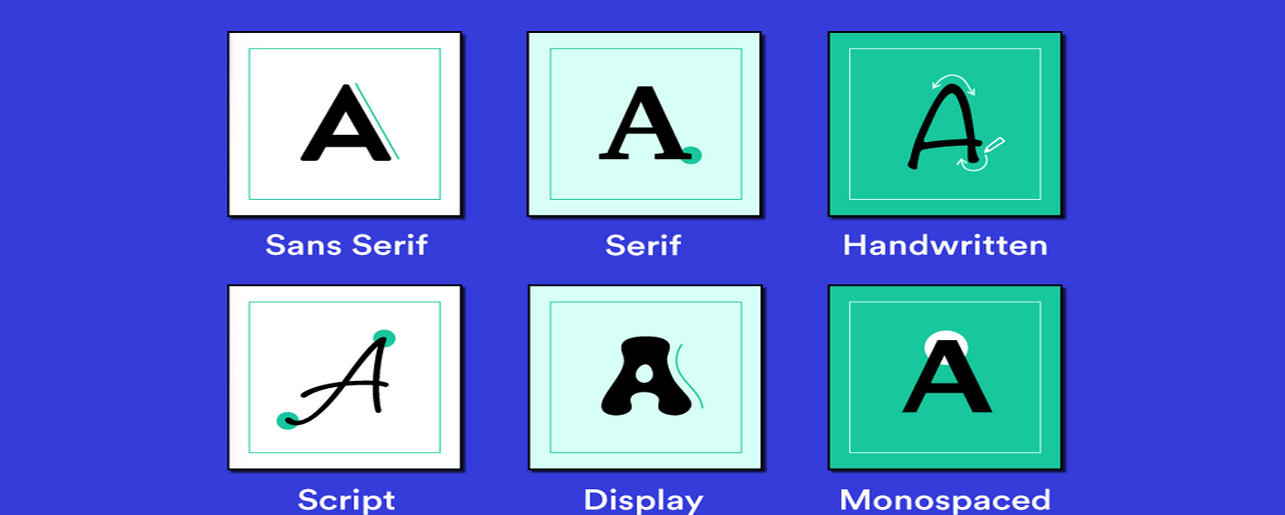
- script: handwriting style
- decorative
- monospace: occupy same space
- serif: traditional and formal
- sans serif: modern
font-family
This option is displayed as a list with the first being higher priority
- will fallback to the others if not installed
Generic fonts include serif, sans-serif, monospace, cursive, fantasy
Web-safe fonts are fonts that are installed on most devices
font-weight
Determines how thick or thin the characters are, value from 100 to 900
- can also be
boldornormal
font-style
Determines if the text is italic or normal.
font-size
Changes the size of the text, can be in pixels, ems, or percentages
emis relative to the parent element,1emis the same size as the parentremis relative to the root or the html element- the recommended is
remfor responsive design
text-align
Aligns the text to the left, right, center, or justified
text-transform
Changes the case of the text, can be uppercase, lowercase, or capitalize
line-height
Determines the space between lines of text, can be absolute or relative
1.5is 1.5 times the font size
letter-spacing
Determines the space between characters, can be positive or negative or relative to the font size
Web-Fonts
Web fonts are added to the website using the @font-face rule
@font-face {
  font-family: 'CustomFont';
  src: url('MyCustomFont.ttf'), url('MyCustomFont.woff'),
       url('https://example.com/MyCustomFont.woff2');
}
* {
  font-family: 'CustomFont', sans-serif;
}- custom fonts can be added using the
srcproperty
Other custom webfonts such as Google Fonts can be added using the link tag in the HTML file