https://github.com/Taitava/obsidian-shellcommands
This is the setting page for each individual commands, there is also a global setting

- the shell command can be executed in plugin section or pressing
Ctrl-Shift-P, or set a keyboard shortcut
Global Settings
In Environments, choose Powershell 5
In Output, choose show until process finished for notification

A Preaction can be set which is a prompt
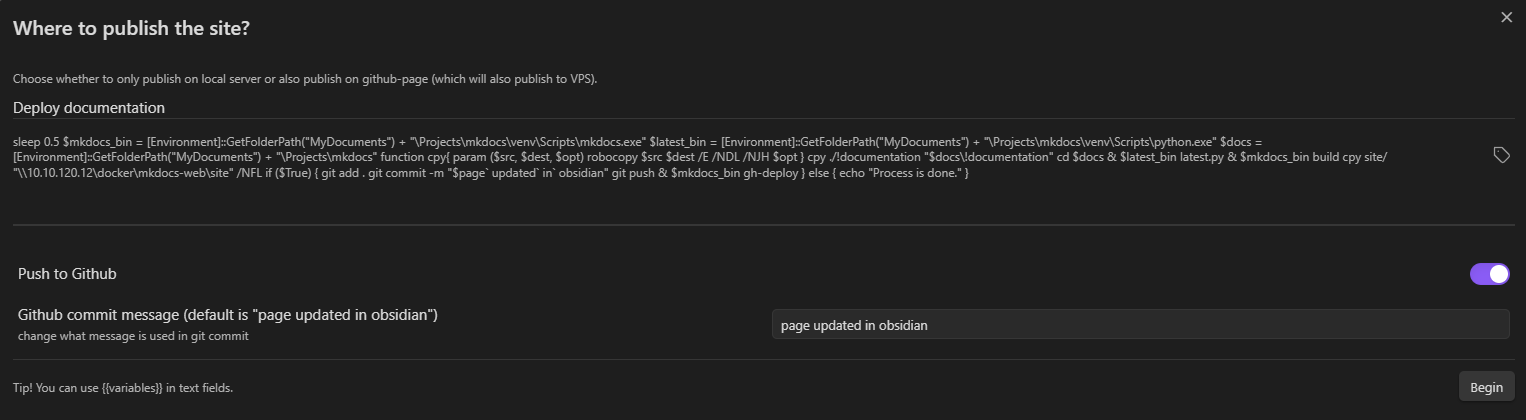
- the fields in a prompt can be a toggle or text field
- the field has variable name with
{{_field}}which can be passed onto the shell - each
preactionneed to be configured individually
For each individual settings page

Under Output, make sure Ask after execution is selected for both stdout and stderr so a modal will show when the command is executed.
This is the script which is used to publish !documentation to multiple sites
- copy the folders from obsidian vault to mkdocs git directory
- build the site using mkdocs
- copy built site to local server first (and only to if
publish to githubis not selected) - git commit the new changes and push
- deploy the site to Github pages
sleep 0.5
$mkdocs_bin =  [Environment]::GetFolderPath("MyDocuments") + "\Projects\mkdocs\venv\Scripts\mkdocs.exe"
$latest_bin = [Environment]::GetFolderPath("MyDocuments") + "\Projects\mkdocs\venv\Scripts\python.exe"
$docs = [Environment]::GetFolderPath("MyDocuments") + "\Projects\mkdocs"
function cpy{
  param ($src, $dest, $opt)
  robocopy $src $dest /E /NDL /NJH $opt
}
cpy ./!documentation "$docs\!documentation"
cd $docs
& $latest_bin latest.py
& $mkdocs_bin build
cpy site/ "\\10.10.120.12\docker\mkdocs-web\site" /NFL
if (${{_github}}) {
  git add .
  git commit -m "${{_commit}}"
  git push
  & $mkdocs_bin gh-deploy
  echo "Published to github."
} else { echo "Process is done." }